Google Veo is arguably the best (but most expensive) AI video generator today. And Google Flow is arguably the best AI filmmaking tool built with and for creatives. Want to peak under the hood and reveal the prompts creating the magic? See Flow TV.
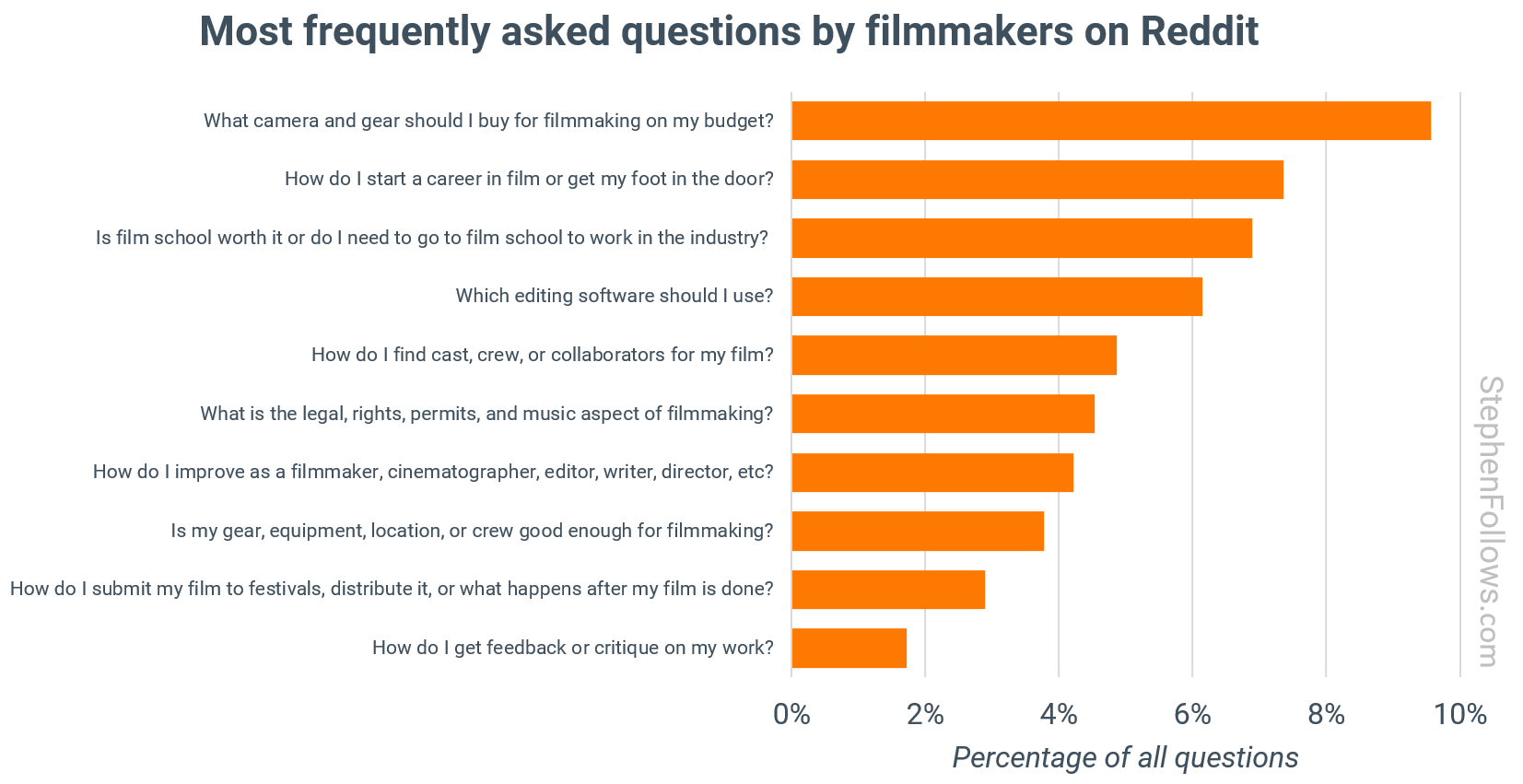
Amazingly, 10 questions accounted for 52% of the total. They are, quoting Stephen:
“1. What camera and gear should I buy for filmmaking on my budget?
The search for the “right” camera and kit never ends, no matter how much technology shifts. People want to know what will give them industry-standard results without breaking the bank. The conversation includes price brackets, compatibility, and whether brand or model really matters to a film’s success.
2. How do I start a career in film or get my foot in the door?
This is the practical follow-up to the film school debate. Filmmakers want straight answers about first jobs, entry points, and which cities or skills lead to real work. Many people are looking for pathways that do not depend on family connections or luck.
3. Is film school worth it or do I need to go to film school to work in the industry?
Filmmakers want clarity on the value of a formal degree versus real-world experience. They are trying to weigh debt against opportunity and want to know if there are shortcuts, hidden costs, or alternative routes into the business.
4. Which editing software should I use?
Software choice raises both budget and workflow issues. Filmmakers want to know which tools are worth learning for professional growth. Questions focus on cost, features, compatibility, and what is expected in professional settings.
5. How do I find cast, crew, or collaborators for my film?
Building a team is a constant sticking point. Most low-budget filmmakers do not have a professional network and are looking for reputable ways to meet actors, crew, or creative partners. Trust and reliability are major concerns, as is the need for effective group communication.
6. What is the legal, rights, permits, and music aspect of filmmaking?
Legal uncertainty is widespread. Filmmakers are confused about permissions, copyright, insurance, and protecting their work and collaborators. They want step-by-step advice that demystifies the paperwork.
7. How do I improve as a filmmaker, cinematographer, editor, writer, director, etc?
Self-development is a constant thread. Filmmakers search for the best courses, books, tutorials, and case studies. Clear recommendations are valued and people want to know what separates average work from great films.
8. Is my gear, equipment, location, or crew good enough for filmmaking?
Questions about minimum standards reflect deeper anxieties about competing in a crowded field. People want reassurance that their toolkit will not hold them back and want to know how far they can push limited resources.
9. How do I submit my film to festivals, distribute it, or what happens after my film is done?
People want clear instructions on taking their finished work to the next level. Festival strategies, navigating submissions, and understanding distribution channels are a minefield. Filmmakers want to know how to maximise exposure and what steps make the biggest difference.
10. How do I get feedback or critique on my work?
Constructive criticism is in high demand. Filmmakers want practical advice on scripts, edits, and showreels. They look for honest reactions to their work and advice on how to keep improving.”
My take: my answers:
The camera on your smartphone is totally adequate to film your first short movie.
Make your own on ramp by creating a brand somewhere online with a minimum viable product – you need to specialize and dominate that niche. Or move to a large production centre.
Maybe, if you can afford it and you’re a people person. Otherwise, spend the money on your own films because every short film is an education unto itself.
Davinci Resolve. Free or Studio.
Your local film cooperative. Don’t have one? Start your own.
Google is your friend. Don’t sweat it too much (and create your own music) for your first short festival films. As soon as your product becomes commercial, you need an entertainment lawyer on your team.
Watch movies, watch tutorials, make weekend movies to practice techniques, challenge yourself. Just do it.
See Answers One and Seven. Note: this is an audiovisual medium; audiences will forgive visuals that fall short but WILL NOT forgive bad sound. Luckily, great sound is easily achievable today.
He completes the package by taking us behind the scenes to reveal his workflow:
The software or services he used and their cost per month (or for this project)? See below:
Midjourney – $30 (images)
Gemini – free (prompts)
ElevenLabs – $22 (voice)
Hume – free (voice)
Udio – $10 (music)
Hedra – $10 (lip sync)
Premiere – $60 (NLE)
RunwayML – $30 (stylize)
Magnific – $40 (creative upscale)
Veo 2 – $1,500 (video at 50 cents/second)
Topaz – $300 (upscale) TOTAL – $2,002 (plus 40 hours of Tim’s time)
In addition to the great AI news and advice, Tim is actually funny:
“At some point in the process Gemini and I definitely got into a bit of a groove and I just ended up ditching the reference images entirely. I have often said that working this way kind of feels a bit like being a writer/producer/director working remotely with a film crew in like let’s say Belgium and then your point of contact speaks English but none of the other department heads do. But like with all creative endeavours you know somehow it gets done.”
My take: Tim’s “shooting” ratio worked out to about 10:1 and there are many, many steps in this work flow. Basically, it’s a new form of animation — kinda takes me back to the early days of Machinima, that, in hindsight, was actually more linear than this process.
1/ If you’re not using a LLM (Gemini, ChatGPT, whatever), you’re doing it wrong.
VEO 2 currently has a sweet spot when it comes to prompt length: too short is poor, too long drops information, action, description etc. I did a lot of back and forth to find my sweet spot, but once I got in a place I thought felt right, I used a LLM to help me keep my structure, length, and help me draft actions. I would then spent an extensive amount of time tweaking, iterating, removing words, changing order, adding others, but the draft would come from a LLM and a conversation I built and trained to understand what my structure looked like, what was a success, or a failure. I would also share the prompts working well for further reference, and sharing the failures also for further reference. This would ensure my LLM conversation became a true companion.
2/ Structure, structure, structure
Structure is important. Each recipe is different but same as any GenAI text-to something, it looks like the “higher on the prompt has more weight” rule applies. So, in my case I would start by describing the aesthetics I am looking for, time of day, colors, mood, then move to camera, subject, action, and all the rest. Once again, you might have a different experience but what is important is to stick to whatever structure you have as you move forward. Keeping it organized also makes it easier to edit later.
3/ Only describe what you see in the frame
If you have a character you want to keep consistent, but you want a close-up on the face for example, your reflex will be to describe the character from head to toe and then mention you want a close-up…It’s not that simple. If I tell VEO I want a face close-up but then proceed to describe the character’s feet, the close-up mention will be dropped by VEO… Once again, the LLM can help you in this by giving it the instruction to only describe what is in the frame.
4/ Patience
Well, it can get costly to be patient, but even if you repeat the same structure, sometimes changing one word can still throw the entire thing out and totally change the aesthetics of your scene. It is by nature extremely consistent if you conserve most words, but sometimes it happens. In those situations, trace your steps back and try to figure out which words are triggering a larger change.
5/ Documenting
When I started “Kitsune” (and did the same for all others), the first thing I did was start a Figjam file so I could save the successful prompts and come back to them for future reference. Why Figjam? So I could also upload 1 to 4 generations from this prompt, and browse through them in the future.
6/ VEO is the Midjourney of video
Currently, no text-to-video tool (Minimax being the closest behind) gave me a feeling I could provide strong art directions and actually get them. I have been a designer for nearly 20 years, and art direction to me has been one of the strongest foundations of most of my work. Dark, light, happy, sad, colorful or not, it doesn’t matter as long as you have a point of view and please…have a point of view. Recently watched a great video about the slow death of art direction in film (link in comments) and oh boy, did VEO 2 deliver on giving me the feeling I was listened. Try starting your prompts with different kinds of medium (watercolor for example), the mood you are trying to achieve, the kind of lighting you want, the dust in the rays of light, etc… which gets me to the next one
7/ You can direct your colors in VEO
It’s as simple as mentioning the hues you want to have in the final result, in which quantity, and where. When I direct shots, I am constantly describing colors for two reasons: 1. Well, having a point of view and 2. reaching better consistency through text-to-video. If I have a strong and consistent mood but my character is slightly different because of text-to-video, the impact won’t be dramatic because a strong art direction helps a lot with consistency.
8/ Describe your life away
Some people asked me how I achieved a good consistency between shots knowing it’s only text-to-video and the answer is simple: I describe my characters, their unique traits, their clothing, their haircut, etc..anything which could help someone visually impaired have a very precise mental representation of the subject.
9/ But don’t describe too much either…
It would be magical if you could stuff 3000 words in the window and have exactly what you asked for, right? Well, it turns out VEO is amazing with its prompt adherence, but there is always a moment where it starts dropping animations or visual elements when your prompt stretches for a tad too long. This actually happens way before the character limit allowed by VEO is reached, so don’t overdo it, it’s no use and will play against the results. For info, 200-250 words seems like a sweet spot!
10/ Natural movements but…
VEO is great with natural movements and this is also one of the reasons why I used it so extensively: people walking don’t walk in slow-motion. That being said, don’t try to be too ambitious on some of the expected movements: multiple camera movements won’t work, full 360 revolutions around a subject won’t work, anime-style crazy camera movements won’t work, etc… what it can do is already great, but there are still some limitations…
“The filmmakers who get noticed are the ones who don’t wait for permission. They write, shoot, and edit their own work. Even a no-budget short is better than waiting for the perfect offer that may never come.”
My take: Great concept! And great production! Watching it, I wondered how they’d execute the “jumping” scene. (A oner with a quick pan away to substitute the stunt performer.) I accomplished something similar with edits only in dust2dust. Can’t wait to see what additional themes Victoria tackles in the feature-length version!
“Cineplex’s role in Canada is, without a doubt, a monopoly. It runs 158 theatres with over 1,630 screens, and it controls approximately 75 percent of domestic box office. By contrast, no one company in the U.S., the UK, or Australia controls more than 30 percent.”
Limit studio Clean Run demands: An overwhelming majority at 81%
of independent film exhibitors are impacted by the “clean
runs” required by major studios.
Eliminate Zones: 53% of independent film exhibitors must
wait for the Cineplex in their “zone” to finish playing a new
release before they are allowed to show it.
My take: this situation can only be addressed with government intervention, as Cineplex has a vested interest in maintaining its monopoly. It’s a pity because competition is actually good.
SBS Scripted is looking for the same things all broadcasters are:
“We want to hear pitches for TV series that thrill us…. Great stories, brilliantly told. Entertaining, culture defining, fresh and unique. Bring us a show we have not seen before. Bring us a show that is brilliantly crafted; a show that has characters that audiences will fall in love with; a show with a propulsive narrative that starts with a bang and keeps audiences deeply engaged.”
That’s why I believe their pitch deck format will work for almost all broadcasters.
My take: download their PDF, start reading from Page 13 and then go back and study everything! Great for all your media projects too.
Unlike other crowdfunding platforms Seed&Spark is purpose-built for film & TV projects. They have a phenomenal 82% success rate.
“Kinema is a tech platform that enables non-theatrical exhibition — what you may call grassroots screening tours — of films in person and online. We make it easy and rewarding for anyone, anywhere to organize moving showings and share in the proceeds.”
Brian states:
“Those who fund programs on Seed&Spark get a dedicated Kinema account manager and custom distribution consultations. Fees are waived for filmmakers with over 500 followers or over 1,000 campaign backers.”
But hey, if you want to DIY, at least check out their free online resource The Distribution Playbook.