Make your logline your pitch!

Franklin Leonard followed up his recent post with “The Moral Case for ‘Selling Out’ 2“.

He begins:

“A lot of people are confusing “logline” with “pitch.” That confusion is definitely costing you reads. PLOT ≠ PITCH. Something you all need to know: Nobody cares about your logline. Even when they ask for your logline, they don’t want your logline. What they want is your pitch. And a pitch is called a pitch because it’s a sales pitch. If your logline functions like a pitch, congratulations: you’ve accidentally done it right. If it reads like a synopsis, it’s dead weight.”

He wants your pitch to make people curious: “In its optimal form, a pitch is the fewest words that create a small, sharp void in someone’s mind that they feel a desperate need to fill.”

He follows up with a list of four logline/pitch templates, with great examples:

  • The What If (aka The Act One) A single disruption that instantly forces the question, “Okay, well, then what happens?”
  • Central Conflict + (Venue and/or Stakes) Two clear forces collide in a specific place and with specific consequences you can feel.
  • Everything Old is New Again A recognizable commercial engine, but with a protagonist swap that changes the moral temperature of the movie.
  • “A meets B” (but only under very specific conditions) Two movies with seemingly opposing values or tones slammed together in a way that creates tension that the audience wants to resolve.

Compare these with the logline formula Michael Anthony taught me:

When an [adjective*] [character] wants an [objective] they must overcome some [obstacle or inciting incident] — but can they succeed or face a [consequence]? (*adjective should be the quality that is tested/changes as a result of the story.)

Michael’s form tends to help you break the story whereas Franklin’s might elicit more curiosity. (Truth be told, Michael’s formula is basically Franklin’s What If model.)

My Take: always be closing! I think realizing your logline needs to pitch your project more than explain the plot actually makes it easier to create.

Writers: give and get feedback for free

StoryPeer.com is a new platform developed by Gabriel Dimilo to help writers get free feedback on their work by giving feedback on other writers’ works anonymously.

Nathan Graham Davis summarized the new site succinctly in this video.

The platform uses tokens to facilitate reviews: offer them to other writers to give notes and hence earn them by reviewing work.

Everyone starts off with seven tokens.

Readers will pick your project based on its title, logline, genre, and length. And how many tokens you offer. A rule of thumb I suggest is to offer one token for every 30 pages.

My take: beware, this can become addictive! I’ve already reviewed two features and received notes on one of my shorts.

What filmmakers really want to know on Reddit

Stephen Follows analyzed over 160,000 questions on Reddit to uncover what filmmakers really ask, need and struggle with.
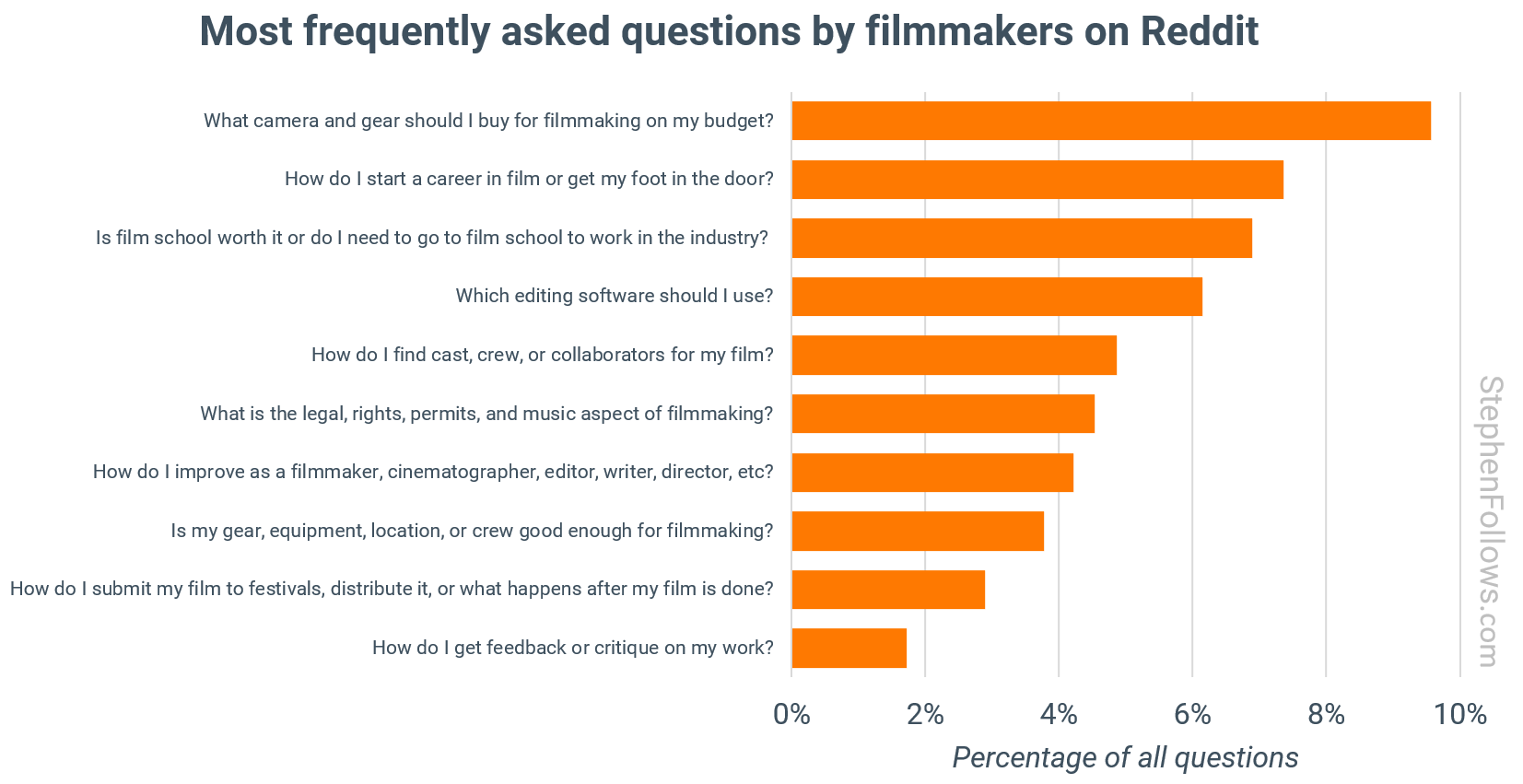
Amazingly, 10 questions accounted for 52% of the total. They are, quoting Stephen:

1. What camera and gear should I buy for filmmaking on my budget?

The search for the “right” camera and kit never ends, no matter how much technology shifts. People want to know what will give them industry-standard results without breaking the bank. The conversation includes price brackets, compatibility, and whether brand or model really matters to a film’s success.

2. How do I start a career in film or get my foot in the door?

This is the practical follow-up to the film school debate. Filmmakers want straight answers about first jobs, entry points, and which cities or skills lead to real work. Many people are looking for pathways that do not depend on family connections or luck.

3. Is film school worth it or do I need to go to film school to work in the industry?

Filmmakers want clarity on the value of a formal degree versus real-world experience. They are trying to weigh debt against opportunity and want to know if there are shortcuts, hidden costs, or alternative routes into the business.

4. Which editing software should I use?

Software choice raises both budget and workflow issues. Filmmakers want to know which tools are worth learning for professional growth. Questions focus on cost, features, compatibility, and what is expected in professional settings.

5. How do I find cast, crew, or collaborators for my film?

Building a team is a constant sticking point. Most low-budget filmmakers do not have a professional network and are looking for reputable ways to meet actors, crew, or creative partners. Trust and reliability are major concerns, as is the need for effective group communication.

6. What is the legal, rights, permits, and music aspect of filmmaking?

Legal uncertainty is widespread. Filmmakers are confused about permissions, copyright, insurance, and protecting their work and collaborators. They want step-by-step advice that demystifies the paperwork.

7. How do I improve as a filmmaker, cinematographer, editor, writer, director, etc?

Self-development is a constant thread. Filmmakers search for the best courses, books, tutorials, and case studies. Clear recommendations are valued and people want to know what separates average work from great films.

8. Is my gear, equipment, location, or crew good enough for filmmaking?

Questions about minimum standards reflect deeper anxieties about competing in a crowded field. People want reassurance that their toolkit will not hold them back and want to know how far they can push limited resources.

9. How do I submit my film to festivals, distribute it, or what happens after my film is done?

People want clear instructions on taking their finished work to the next level. Festival strategies, navigating submissions, and understanding distribution channels are a minefield. Filmmakers want to know how to maximise exposure and what steps make the biggest difference.

10. How do I get feedback or critique on my work?

Constructive criticism is in high demand. Filmmakers want practical advice on scripts, edits, and showreels. They look for honest reactions to their work and advice on how to keep improving.”

My take: my answers:

  1. The camera on your smartphone is totally adequate to film your first short movie.
  2. Make your own on ramp by creating a brand somewhere online with a minimum viable product – you need to specialize and dominate that niche. Or move to a large production centre.
  3. Maybe, if you can afford it and you’re a people person. Otherwise, spend the money on your own films because every short film is an education unto itself.
  4. Davinci Resolve. Free or Studio.
  5. Your local film cooperative. Don’t have one? Start your own.
  6. Google is your friend. Don’t sweat it too much (and create your own music) for your first short festival films. As soon as your product becomes commercial, you need an entertainment lawyer on your team.
  7. Watch movies, watch tutorials, make weekend movies to practice techniques, challenge yourself. Just do it.
  8. See Answers One and Seven. Note: this is an audiovisual medium; audiences will forgive visuals that fall short but WILL NOT forgive bad sound. Luckily, great sound is easily achievable today.
  9. FilmFreeway.com
  10. Send me a link to your screener; I’ll watch anything and give you free notes on at least three things to improve.

FREE AI Video Course for Beginners

Seattle’s Yutao Han, aka Tao Prompts, has just released a 17 minute YouTube tutorial on how to create your first, free, AI-generated short movie.

Let’s assume you already have a script. You can write, right? If not, your favourite LLM can help you ideate and flesh out your thoughts.

“To actually make the AI videos, the method we’ll be using is: Image to Video. What this means is we’ll take a reference image and then use an AI video generator to turn it into a video. After generating thousands and thousands of videos I found that using reference images is how you’re going to get the most consistent results and the highest quality overal.”

The tools he highlights for generating images?

  • Midjourney
  • ChatGPT
  • Leonardo
  • Recraft

“When you’re using Recraft the resolution of the generated images is already pretty high at 1820 by 1024. That’s plenty enough for pretty much any AI video generator to get the maximum quality.”

The AI Video Generators he highlights?

  • Kling
  • Runway
  • Google Veo
  • Sora
  • Luma Labs
  • Pika Labs
  • Hailuoai

Next processes? Generating voices, lip-syncing the audio, generating music and editing everything together.

My take: he calls this AI Animation and it does follow the traditional animation process much closer than live-action filmmaking.

CineVic’s best film festival ever!

CineVic just concluded the best-ever Short Circuit Pacific Rim Film Festival in Victoria, BC, Canada, last weekend.

A new addition this year was Indie+Industry on the closing day that began with brunch at Vista 18 on top of the Chateau Victoria.

Then Johnny Brenneman and David Malysheff told us all about creating their new 8-episode series Bon Victoriage! for Telus Storyhive.

The next session saw Panta MoslehShiraz Higgins and Heather Lindsay share their experiences and hard-won wisdom.

The last panel saw Daryl Litke (ACFC West Local 2020 Unifor,) Wendy Newton (ICG 669,) Andrea Moore (DGC BC) and Michael Rosser (IATSE 891) explain the benefits of working with unions and guilds.

My take: I met great people and got some valuable feedback on my upcoming feature documentary. Definitely CineVic’s best film festival yet, and, finally, after years of contributing in various ways, I wasn’t involved at all.


Gaze control, at last

Haydn Rushworth shares his AI filmmaking journey with all on YouTube and says, “Finally, AI Filmmaking Tools I DESPERATELY Need!”

He has a list of 18 categories of things he feels filmmakers need to specify and,

“Number one and number two for me are gaze control and expression control.”

He explains:

“The reason you need gaze control or eye control is because where a character is looking in a story tells you everything about what they want or what they don’t want, what they’re afraid of. It shows you what their desires are, what their hopes, their dreams, their aspirations, the thing that they’re working towards. The thing that is most important to them in any given moment is revealed through what they are looking at.”

Dzine to the rescue! See their new Face Kit Expression Edit in action below.

He squeals, “She’s looking at the guy. She’s looking at the guy. She’s looking at the guy!”

Here’s the full tutorial:

My take: Hayden is right. More control is critical for all AI filmmakers.

How to create a TV Pitch Deck

Australia’s Special Broadcasting Service (SBS) has a great Scripted Pitch Guide.

SBS Scripted is looking for the same things all broadcasters are:

“We want to hear pitches for TV series that thrill us…. Great stories, brilliantly told. Entertaining, culture defining, fresh and unique. Bring us a show we have not seen before. Bring us a show that is brilliantly crafted; a show that has characters that audiences will fall in love with; a show with a propulsive narrative that starts with a bang and keeps audiences deeply engaged.”

That’s why I believe their pitch deck format will work for almost all broadcasters.

My take: download their PDF, start reading from Page 13 and then go back and study everything! Great for all your media projects too.

How to Create Consistent AI Characters

Caleb Ward of Curious Refuge has released 2024’s best summary of how to Create Consistent Realistic Characters Using AI.

He suggests using Fal.AI to train a custom LoRA ( fal.ai/models/fal-ai/flux-lora-fast-training ) with at least 10 images of the subject. Then use this model to generate images ( fal.ai/models/fal-ai/flux-lora ) and increase their resolution using an up-res tool. Finally, you can now move on to animating them.

CyberJungle, the Youtube channel of Hamburg-based Senior IT Product Manager Cihan Unur, also posted How to Create Consistent Characters Using Kling AI.

He details how to train a LoRA on Kling using at least eleven videos of your character. Admittedly, this pipeline is a little more involved. He also suggests FreePik as another option.

My take: basically, if you can imagine it, you can now create it.

The Horror Movie Report just released!

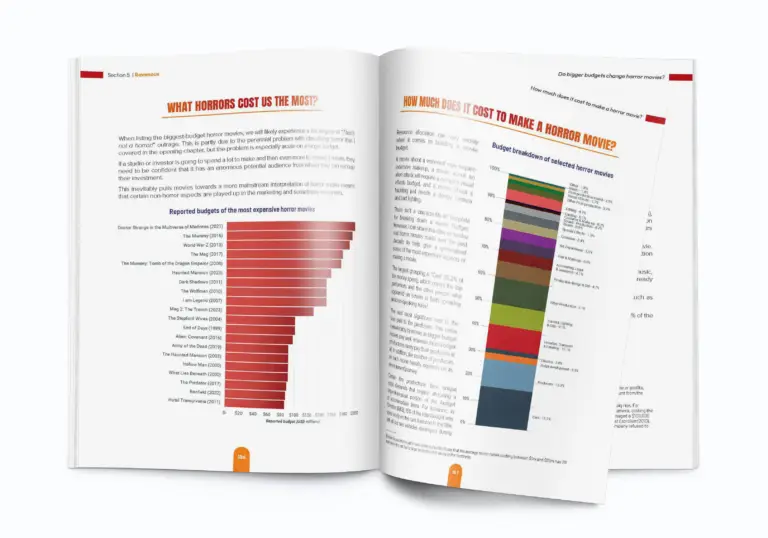
Stephen Follows has just released The Horror Movie Report, the most comprehensive case study of the horror genre ever, with data from over 27,000 films.

The report is offered in English and Spanish and comes in two editions:

  • Film Fan Edition is aimed at general audiences. (£24.99)
  • Film Professional Edition is designed for those in the film industry and includes extra insights on profitability, and budgets, and comes with all the data as spreadsheets. (£79.99)

At over 400 pages, the report contains chapters on:

  1. Horror Audiences
  2. Subgenres
  3. Script Origins
  4. Cast
  5. Crew
  6. Budgets
  7. Financials
  8. Box Office
  9. Profitability
  10. Other Income
  11. Film Festivals
  12. Post Production
  13. Posters and Marketing
  14. Objectionable Content
  15. Cultural Impact

Stephen is a leading film industry analyst known for his extensive research on film statistics; I’ve quoted his posts many times.

See the sample pages.

My take: Peter, this would make a great holiday gift for someone who aspires to produce a profitable film, no matter what the genre. The Professional Edition even comes with downloadable Excel files. Excel files!

Any pose in MJ: ECU on a detail and then ZOOM OUT

Glibatree (Ben Schade) recently implored on YouTubeDo THIS to Create Amazing Poses in Midjourney!!!

The problem with a lot of image generators is that they love selfies: front-facing portraits. But what if you want a profile? Ben has a two-step work-around:

“Generate a close-up photo of your subject’s ear and then use the editor to zoom out and create the rest of the image.”

He explains:

“The reason this works is because what Midjourney needed was a pattern interrupt. Take advantage of its usual way to generate images by finding the usual way to generate an image with a more unusual focus. It’s better to choose a focus that is already often viewed from the angle we want.

  • focus on a ponytail if we want to see the back of someone’s head
  • use a receding hairline to see someone from straight above
  • focus on the back pocket of a pair of jeans if you want the…
  • I wouldn’t recommend looking up someone’s nostril (I mean it’s an angle that works but I just wouldn’t recommend it.)

The point is we can generate any of these things using extremely simple prompts and get very unusual angles to be seeing a person from. And then starting from there once we have the angle well defined we can simply zoom out and make our chosen feature less prominent by changing our prompt to something else and so in the new image the angle we wanted is extremely well defined not by tons of keywords but by the part of the image we already generated.”

This works for Expressions as well. He explains:

“If we start with a photo of just a smile or just closed eyes or just a mischievous smirk, Midjourney will spend all of its effort to create a high quality closeup version of the exact expression we wanted that now, in just one more generation, we can apply to our character by simply zooming out.”

My take: thank you, Ben, for cracking the code!